Detection rules
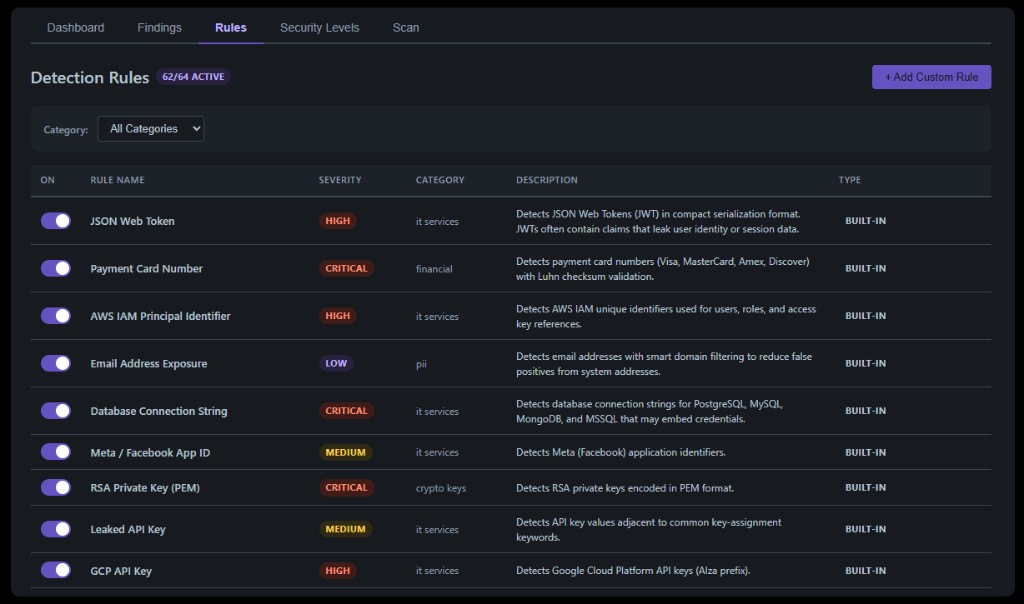
The Rules tab shows all available detection rules. Each rule has a name, severity, category, and description.
Built-in rules
Zeroph Sentinel ships with 68 built-in rules covering:
- Cloud credentials for AWS (IAM identifiers, secret keys, MWS tokens), Azure (storage credentials, SAS tokens), and GCP (API keys, service account keys, OAuth tokens).
- Code platform tokens for GitHub, GitLab, Bitbucket, and npm.
- AI platform keys for OpenAI and Anthropic.
- Payment credentials for Stripe, Square, Braintree, and Shopify.
- Communication services including Slack, Twilio, SendGrid, Mailchimp, Mailgun, and Heroku.
- Infrastructure secrets including database connection strings, Redis URIs, Docker auth, environment file content, and credentials embedded in URIs.
- Cryptographic keys including RSA, EC, DSA, PKCS#8, OpenSSH, and PGP private keys.
- Authentication tokens including JWTs, Bearer and Basic auth headers, and generic API key/secret patterns.
- Financial data including credit card numbers (with Luhn validation), bank routing numbers, and US Social Security Numbers.
- PII including email addresses (with smart domain filtering) and phone numbers.
- Trojan source detection for Unicode bidirectional control characters.
Toggle any rule on or off using the switch in the rules table. Changes take effect on the next scan.
Custom rules
Click Add Custom Rule to define your own regex-based detection pattern. Provide a name, description, regex pattern, severity, and category. Custom rules appear alongside built-in rules and can be deleted at any time.