Security level policies
The Security Levels tab provides two features for Jira issue security levels.
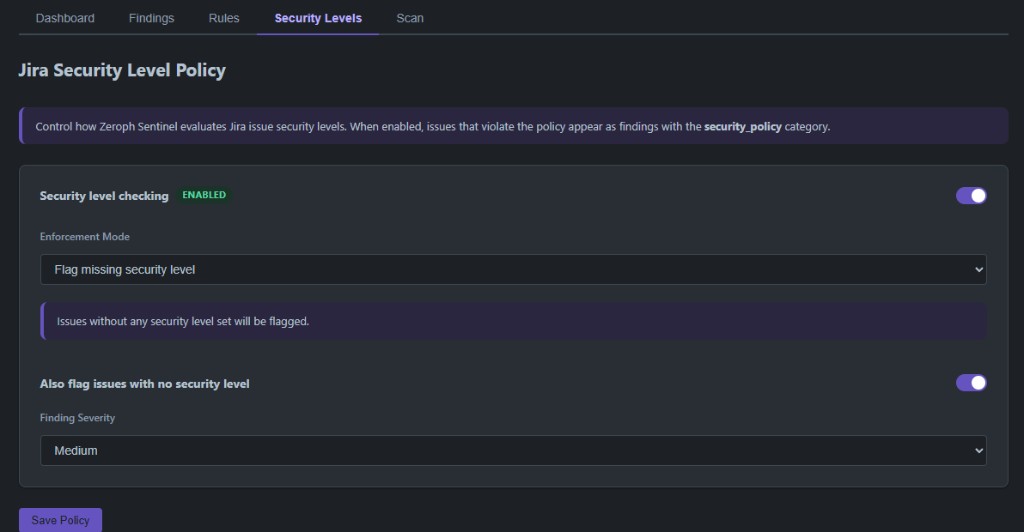
Security level checking
When enabled, Zeroph Sentinel evaluates the security level of each Jira issue and creates findings for issues that violate the policy. Three enforcement modes are available:
- Flag missing security level flags any issue with no security level set.
- Flag issues below a minimum level requires you to define a ranked list of security levels (lowest to highest) and a minimum. Issues below the minimum are flagged.
- Only allow specific levels (allowlist) flags any issue whose security level is not in the allowed list.
You can also toggle whether issues with no security level at all should be flagged, and set the finding severity.
Rule exemptions by security level
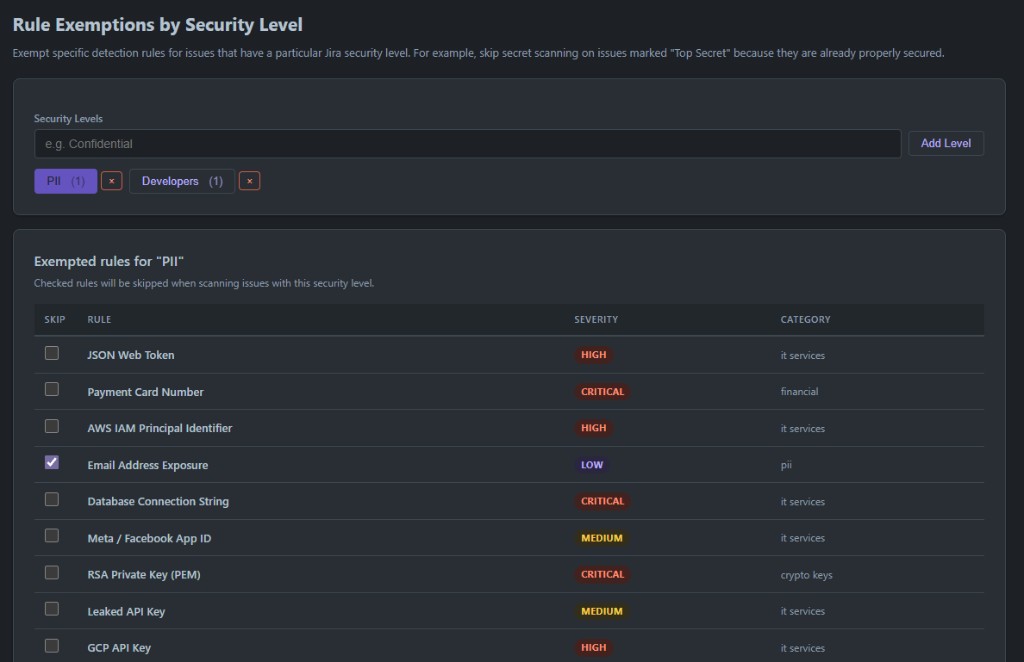
This feature lets you skip specific detection rules for issues that have a particular Jira security level. For example, you might exempt email address detection on issues marked "Confidential" because those issues are already appropriately secured.
To configure exemptions:
- In the Rule Exemptions by Security Level section, enter a security level name (matching the exact name in your Jira security scheme) and click Add Level.
- Click the level name to select it. A table of all enabled rules appears.
- Check the rules you want to skip for issues at that security level.
- Click Save Exemptions.
You can add multiple security levels, each with different exempted rules.